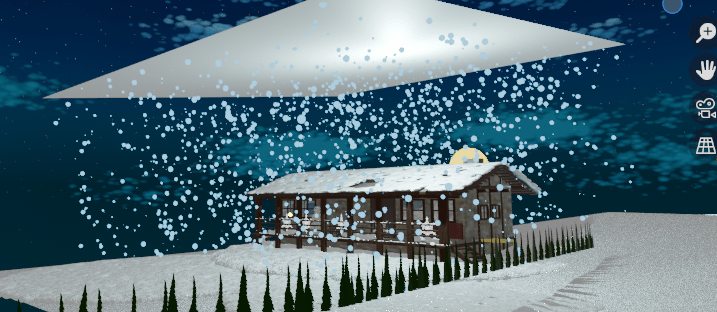
I made a couple of videos with snow in Blender (in this one below, the snow starts about 10 seconds in):
To make the snow, I am using the particle systems in Blender to release the snow. I have an emitter over my scene:
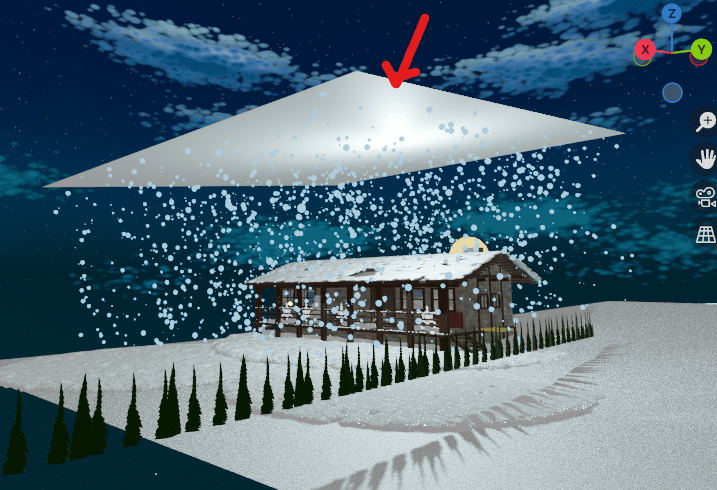
And I’m using an icosphere for the snow. I put an emission on the snow, and I used bloom, or glare/fog lights in the compositor. Bloom, or the glare/fog lights, really make the difference in making it look so much better!
Now, when I first did all this, however, I got the snow falling way, way too fast.
I didn’t know how to fix it, so in my earlier snow videos, I had to just render it out as is, and then when I put the video together, I made the frame rate go slower.
But that’s not really a long-term solution, so I eventually had to go back into the behind-the-scenes and make a real fix. First, I thought, let me add some wind and turbulence, maybe that will make the snow not just come straight down like a ball dropping. Because snow doesn’t just plop down, it sort of flutters like a butterfly on its descent. That helped a little — it did give the snow some variation and movement as it falls.
Then finally, I also played with the drag, damp, the Brownian forces. I’m sure a physicist will be disappointed to hear this, but I don’t really know what any of those mean. However, I played and played with the settings, and after trying it a couple of times, I found something that worked … it made my snow fall nice and slowly, right in the scene. I left both Brownian and drag at 0, and I put the damp at 0.02. I also have the normal velocity set to, for “normal”, 0.00003 m/s. (But I don’t think that’s important, you can probably leave it at zero.)
Any case, so that’s how I made my nice snow! In sum:
- add wind and turbulence to make the snow flutter about like a butterfly on its descent, rather than falling straight down.
- put the damp at 0.02

 mejshasan.com